Four different jobs. One working website.
Buying a domain, publishing DNS records, serving HTTPS traffic and storing website files are distinct responsibilities. They can be provided by different companies—or by the same company.
Core concepts you encountered
Expand any card to see how the concept applies to your own website.
The person or organization that holds the right to use a registered domain for its registration term, subject to registrar and registry policies. A domain is renewed, not purchased forever.
A registrar is the accredited retail provider through which you register and renew a domain. The registry operates the top-level domain database (for example, .com). ICANN coordinates key naming-system policies and contracts.
A nameserver that provides authoritative answers for records in a DNS zone. It is the source of truth for the zone, unlike a caching recursive resolver.
“DNS server” is a broad term. A recursive resolver looks up answers for a client and caches them; authoritative nameservers publish the zone’s records. Root and TLD nameservers guide the resolver through the hierarchy.
The parent DNS zone lists the nameservers responsible for the child domain. Changing nameservers at the registrar changes delegation, not the HTML files.
binitdatta.com is the registered domain and zone apex (root). www.binitdatta.com is a hostname under it; “www” is a conventional subdomain label, not a required Internet service.
A DNS zone is the administratively managed collection of records. TTL (time to live) tells caching resolvers how long an answer may be reused. Changes can appear at different times due to caches.
A canonical-name record aliases one DNS name to another DNS name. It does not directly contain a server IP address, nor does it perform a browser HTTP redirect.
With proxied (orange-cloud) records, visitors generally connect to Cloudflare edge IPs, where Cloudflare can terminate TLS, apply security and caching, and route requests to Pages.
Static hosting serves prebuilt HTML, CSS, JavaScript, images and other assets without requiring a traditional application server to render each page. JavaScript can still run in the visitor’s browser.
HTTPS is HTTP protected by TLS. During a TLS handshake, the browser validates a certificate for the requested hostname and negotiates encryption. A certificate does not itself register a domain.
A hosting platform associates a public hostname with a specific deployment. TLS SNI and HTTP Host/:authority help the edge identify which site a visitor requested.
A 301 response instructs the browser to request a different URL. This happens after DNS and HTTP(S) connection handling; it is distinct from CNAME resolution. A canonical URL is the preferred public address.
The browser, operating system and recursive resolver may cache DNS answers; browsers and CDN edges may cache HTTP assets or redirects. These caches have different lifetimes and behaviors.
In https://binitdatta.com/architecture?topic=erp#erp-architecture, the scheme is https, host is binitdatta.com, path is /architecture, query is topic=erp, and fragment is erp-architecture. The fragment is handled by the browser, not sent in the HTTP request.
Who governs the DNS namespace—and who answers queries?
DNS is a distributed, hierarchical naming system. No single DNS server stores every domain. The hierarchy delegates authority from the root to top-level domains and then to the authoritative nameservers for individual domains.
ICANN and IANA
ICANN coordinates policies and key identifiers for the global domain-name system. Through its IANA functions, it coordinates the DNS root zone, including delegations to TLD operators. ICANN does not resolve every browser query or directly host your website.
Root zone management: IANA coordinates root-zone changes; the root-zone maintainer and root server operators play separate operational roles.
Hierarchy: root → .com → binitdatta.com
Root (.) delegates to TLD nameservers. .com TLD nameservers, operated by the .com registry, delegate binitdatta.com to its assigned authoritative nameservers. Cloudflare authoritative DNS supplies the zone's DNS responses.
Your registrar account at Bluehost controls which nameservers are published for your domain at the registry.
A.root-servers.net through M.root-servers.net, not merely 13 physical machines or 13 geographic clusters. The historical count reflects the original DNS transport/packet-size constraints. Today, independent operators deploy these identities across many hundreds of anycast instances worldwide for resilience, performance, and global reach. Root servers direct resolvers to TLD nameservers; they generally do not return the final IP for a website.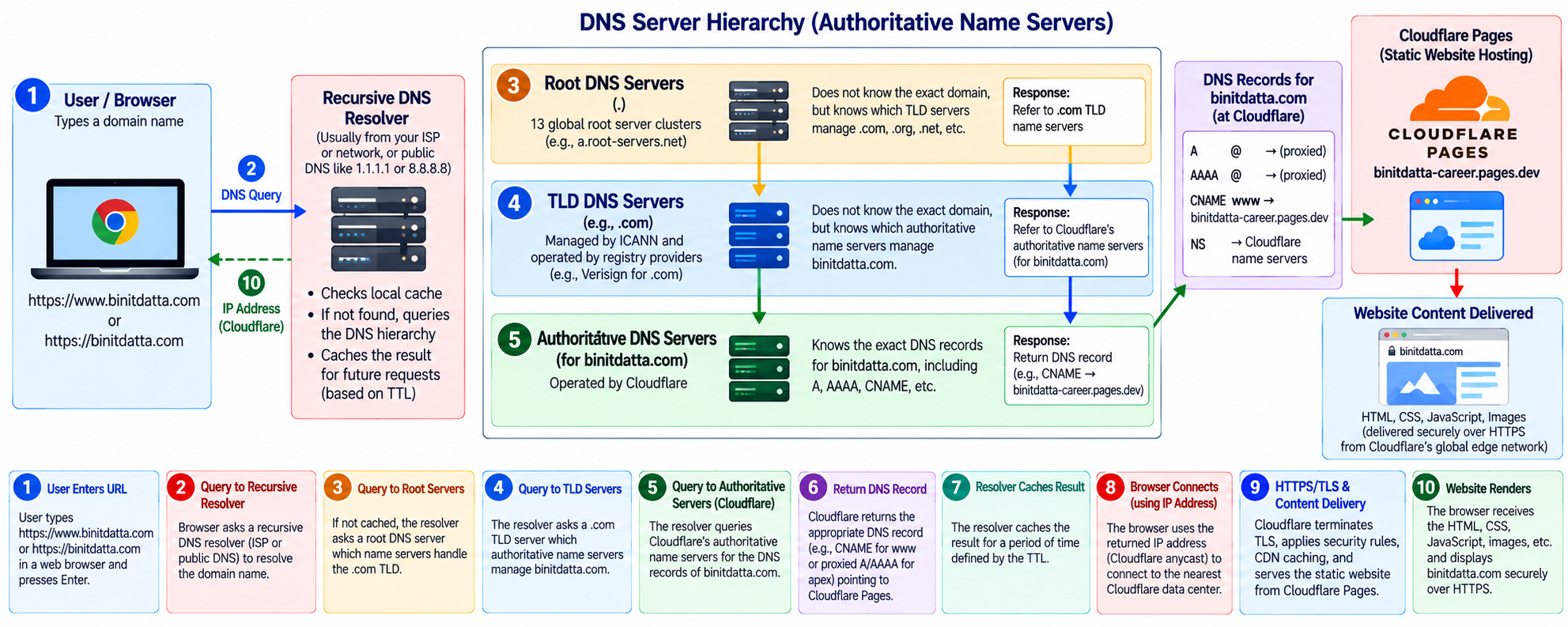
How the DNS hierarchy resolves your domain
A recursive resolver does the legwork on behalf of the browser. The following is a typical cold-cache lookup; caching can skip several of these steps.
www.binitdatta.com, the browser may first consult its own cache and the OS resolver cache. A recursive DNS service (ISP, enterprise, or public resolver such as 1.1.1.1) checks its cached data before asking other servers..com TLD, rather than an address for the site..com nameserver. The registry's delegation identifies the authoritative nameservers for binitdatta.com: abby.ns.cloudflare.com and kanye.ns.cloudflare.com.www are configured as proxied CNAMEs targeting binitdatta-career.pages.dev. With proxying enabled, public address lookups normally return Cloudflare edge IP addresses rather than the internal CNAME targets. Cloudflare's apex CNAME flattening also permits the root hostname to be configured as a CNAME-like record.www → apex redirect. After HTTPS is established for www.binitdatta.com, your Cloudflare Redirect Rule returns HTTP 301; the browser then requests https://binitdatta.com/. Root, TLD, and authoritative DNS servers are not HTTP redirect servers.Know what each DNS record actually does
| Record | Purpose | Example / caution |
|---|---|---|
| A | Maps hostname to IPv4 address | 203.0.113.10 (documentation example) |
| AAAA | Maps hostname to IPv6 address | 2001:db8::10 (documentation example) |
| CNAME | Aliases a hostname to another DNS name | www → binitdatta-career.pages.dev |
| NS | Delegates DNS authority to nameservers | abby.ns.cloudflare.com, kanye.ns.cloudflare.com |
| SOA | Zone authority and timing metadata | Maintained by the DNS provider |
| MX | Mail server routing | Only relevant if you configure domain email |
| TXT | Text metadata, verification, SPF, DMARC and more | Does not serve your HTML |
| CAA | Restricts certificate authorities permitted to issue certificates | May affect TLS certificate issuance |
Your actual Cloudflare setup
1. Registrar delegation
At Bluehost, you changed the domain’s nameservers to Cloudflare’s assigned pair.
abby.ns.cloudflare.com
kanye.ns.cloudflare.com
2. Cloudflare DNS records
Cloudflare manages the DNS zone. Both hostnames are configured as proxied CNAMEs targeting the Pages project.
@ → binitdatta-career.pages.dev
www → binitdatta-career.pages.dev
3. Pages custom domains
Inside the binitdatta-career Pages project, you added binitdatta.com and www.binitdatta.com. Both subsequently showed Active with SSL enabled.
4. Canonical-host redirect
You deployed a Cloudflare Single Redirect: requests for the HTTPS www hostname receive a 301 pointing to the root hostname.
https://www.binitdatta.com/*
↓ 301
https://binitdatta.com/${1}What happens when you type https://binitdatta.com?
The precise network messages depend on caching, browser features and connection reuse, but this is the typical logical sequence for a fresh visit.
Parse the URL
The browser identifies the HTTPS scheme, hostname binitdatta.com, path / and default HTTPS port 443. It checks whether an existing connection or cached response can be reused.
Find a DNS answer
The browser/OS consults DNS caches and typically asks a recursive DNS resolver. On a cache miss, the resolver can follow root → .com TLD → Cloudflare authoritative nameserver delegation. Cloudflare provides the appropriate DNS answer; because the record is proxied, the browser normally receives Cloudflare edge addresses.
Connect to a Cloudflare edge
The browser establishes a network connection to a Cloudflare IP address. The route often uses anycast to reach a nearby available Cloudflare location. The IP alone does not identify which customer site should be served.
Negotiate TLS and validate identity
The browser and Cloudflare negotiate TLS; the browser checks that the certificate is trusted and valid for binitdatta.com. SNI commonly indicates the requested hostname during the TLS handshake.
Send the HTTP request
Inside the encrypted connection, the browser sends an HTTP request containing the path and host identity (Host header in HTTP/1.1 or :authority in HTTP/2/3).
GET / HTTP/1.1
Host: binitdatta.comApply edge routing and security
Cloudflare can evaluate relevant security, redirect, and caching rules. Its Pages custom-domain mapping identifies the binitdatta-career project for the requested hostname.
Deliver the static site
Cloudflare Pages returns the deployed entry document (typically index.html for /), either from edge cache or the Pages delivery infrastructure. There is no requirement to execute a Spring Boot or Flask server for this static page.
Load CSS, JavaScript, images and fonts
The browser parses HTML, requests referenced assets such as styles.css, script.js, and assets/images/..., executes client-side JavaScript, and paints the page. Third-party Bootstrap and Google Fonts URLs are fetched from their respective hosts.
Navigate and reuse caches
Further page visits may reuse DNS results, TLS connections, and cached assets. Links to architecture.html request another static document; an anchor such as #erp-architecture navigates within the loaded document in the browser.
What changes when the visitor enters www?
https://binitdatta.com
The browser resolves the apex hostname, connects securely to Cloudflare, and requests the site directly through the Pages custom-domain mapping.
Browser → Cloudflare edge
→ Pages → index.htmlhttps://www.binitdatta.com
The browser resolves www, establishes HTTPS to Cloudflare, and receives the configured 301. It then makes a new request to the apex hostname.
Browser → Cloudflare edge
← 301 Location: https://binitdatta.com/
Browser → binitdatta.com → Pages| Incoming request | Expected redirect target |
|---|---|
https://www.binitdatta.com/ | https://binitdatta.com/ |
https://www.binitdatta.com/architecture | https://binitdatta.com/architecture |
https://www.binitdatta.com/articles?topic=ai | https://binitdatta.com/articles?topic=ai when Preserve query string is enabled |
https://www.binitdatta.com/architecture#erp-architecture | https://binitdatta.com/architecture#erp-architecture in normal browser navigation; the fragment never travels in the HTTP request |
The complete web hosting ecosystem
This illustration brings together the organizations that administer domain names, the infrastructure that resolves them, the certificate trust system, and the Cloudflare services that deliver your website. The numbered boxes describe roles, not a single serial packet route: domain registration and certificate issuance happen outside the normal per-visit DNS/HTTP sequence.
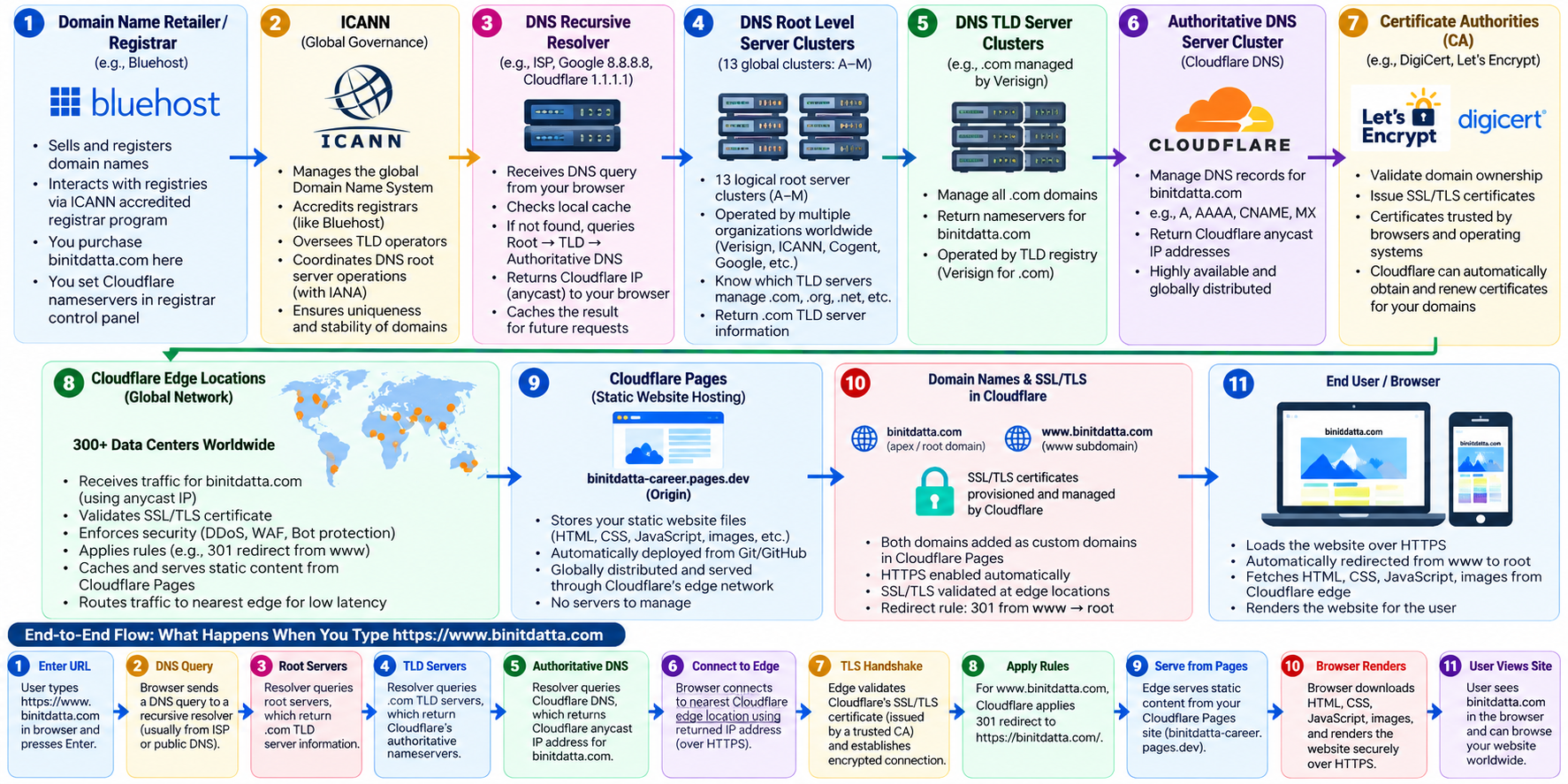
Roles and responsibilities of all 11 components
Domain registrar — Bluehost
Bluehost is the retail registrar through which the domain is registered and renewed. The registrant controls its registration and changes the delegated nameservers in the registrar account. Registration does not store or serve the website.
ICANN, IANA, and the registry
ICANN coordinates policies and contracts for the domain-name system; IANA functions coordinate the DNS root zone. Verisign operates the .com registry and its TLD nameservers. ICANN does not handle each visitor’s DNS lookup or host your pages.
Recursive DNS resolver
A recursive resolver, commonly provided by an ISP or a public DNS service, answers the client’s hostname lookup. It checks its cache first and, when necessary, follows the DNS hierarchy. The browser or operating system may also cache answers.
Root DNS server system
The root zone has 13 named root-server identities (A through M), run by 12 independent operators and replicated across many anycast sites worldwide. Root servers refer resolvers to the appropriate TLD nameservers; they do not normally return the IP address of your website.
.com TLD nameservers
The .com top-level-domain nameservers, operated by the .com registry, provide delegation information for binitdatta.com, pointing resolvers toward the domain’s authoritative nameservers. They do not contain the website’s HTML.
Authoritative DNS — Cloudflare
Cloudflare is authoritative for the binitdatta.com DNS zone through the delegated nameservers. It manages records for the apex and www hostnames, pointing the Pages custom domains to binitdatta-career.pages.dev. With proxying enabled, public DNS typically returns Cloudflare edge addresses.
Certificate authorities and trust stores
A certificate authority validates the appropriate domain-control evidence before issuing a TLS certificate. Cloudflare provisions certificates for active custom domains. During a TLS handshake, the visitor’s browser validates the certificate chain, hostname, validity period, and trust against its trust store; certificate revocation checks depend on client policy.
Cloudflare edge and network security
The browser connects to a Cloudflare edge IP. Cloudflare terminates the HTTPS connection, applies relevant security and redirect rules, and may serve cached static assets. The configured www-to-apex 301 is an HTTP response from this layer; it is not a DNS operation.
Cloudflare Pages deployment
The deployed static site is associated with binitdatta-career.pages.dev and both custom hostnames. Pages distributes and serves HTML, CSS, JavaScript, and image assets through Cloudflare’s infrastructure. Pages is a hosting/deployment platform, not necessarily a single origin server.
Custom hostnames, certificates, and redirects
Both binitdatta.com and www.binitdatta.com are configured as Pages custom domains with SSL enabled. A permanent 301 rule redirects HTTPS requests for www to the apex hostname, preserving paths and, when enabled in the rule, query strings.
End-user browser
The browser parses the URL, obtains a DNS answer, establishes an encrypted HTTPS connection, sends HTTP requests, processes any 301 redirect, downloads assets, and renders the website. Subsequent navigation can reuse cached DNS, connections, and static resources.
Three different workflows — do not confuse them
Registration and delegation
Registrant → Bluehost registrar → .com registry delegation → Cloudflare authoritative nameservers. This is configured ahead of time, not repeated for every visitor.
DNS lookup
Client → recursive resolver → root referral → .com referral → Cloudflare authoritative answer. Cached information may skip some or all upstream queries.
TLS, redirect, Pages
Browser → Cloudflare edge TLS handshake → browser validates certificate → HTTP 301 for www → new apex request → Pages content → browser rendering.
Browser-to-Cloudflare navigation architecture
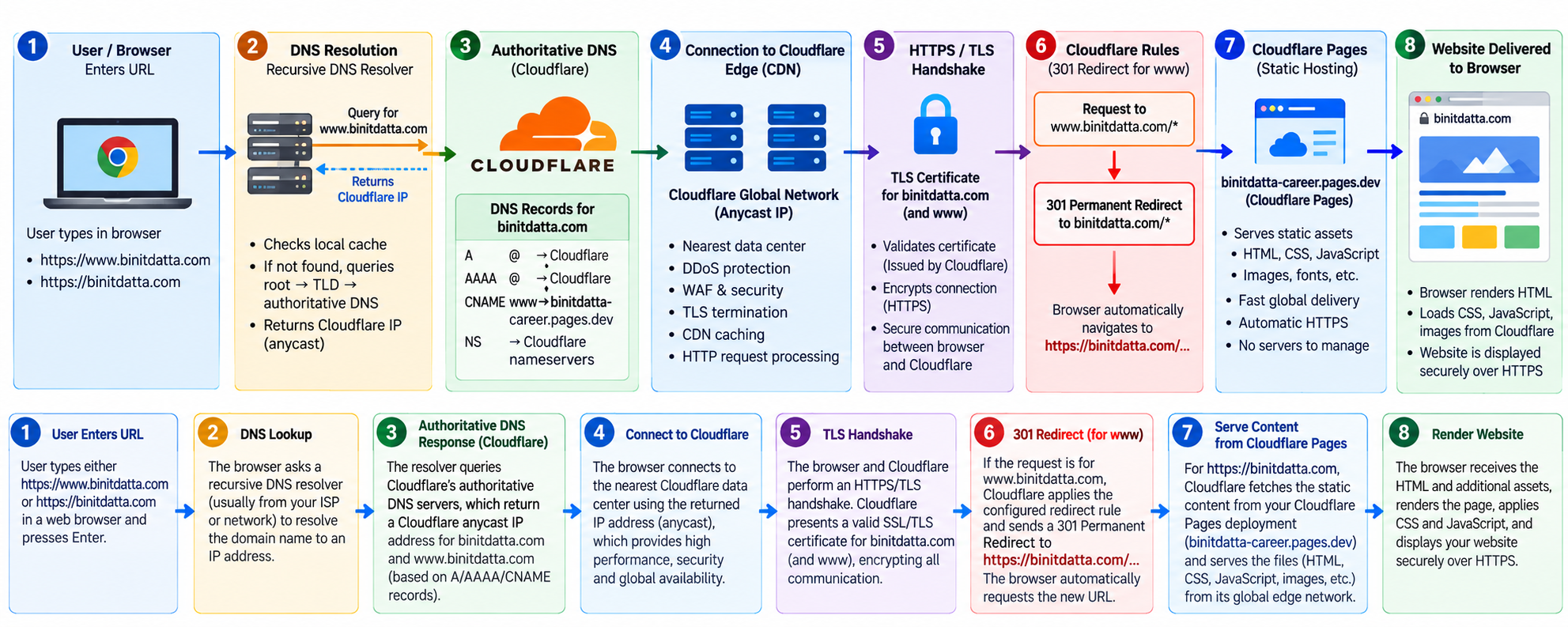
The diagram connects the DNS hierarchy to the HTTPS request, Cloudflare edge processing, your canonical-host redirect, and Cloudflare Pages content delivery. Click the image to inspect it at full resolution.
Browser entry and recursive lookup
A visitor enters the URL. The browser or operating system requests DNS resolution, using caches where possible. On a cache miss, a recursive resolver follows root, TLD, and authoritative delegations.
Authoritative answer and edge connection
Cloudflare's authoritative nameservers answer for the zone. Because the DNS records are proxied, the browser connects to a Cloudflare anycast edge IP. Cloudflare's network routes the connection to an available edge location.
TLS and canonical redirect
The browser validates Cloudflare's certificate and establishes HTTPS. For www.binitdatta.com, your active Redirect Rule returns HTTP 301 to the corresponding apex URL, preserving the path and configured query string. For the apex hostname, this redirect step is skipped.
Pages delivery and browser rendering
Cloudflare maps binitdatta.com to the binitdatta-career Pages project, returns HTML and other static assets, and the browser constructs and renders the document. CSS, JavaScript, fonts, and images may trigger additional requests.
https://binitdatta.com goes straight from edge handling to Pages delivery; https://www.binitdatta.com first receives a 301 and initiates a new request to the apex. The Pages hostname binitdatta-career.pages.dev identifies the deployment target—it is not a mandatory browser-visible redirect or a separate DNS hop after TLS.How to diagnose problems without changing the wrong layer
pages.dev URL works. Do not assume a 403 proves DNS is broken.styles.css, script.js, and referenced assets together with the correct relative paths when publishing a new Pages deployment. Uploading only index.html and web-hosting.html without the existing shared assets will leave the styling and images incomplete.One-minute glossary
Registration versus hosting
The registrar maintains your right to use the domain; the hosting platform serves your deployed website files.
Authoritative DNS versus resolver
Cloudflare authoritative DNS publishes answers; a recursive resolver retrieves and caches them for clients.
CNAME versus 301
A CNAME changes how a hostname resolves in DNS. A 301 changes the URL the browser requests.
Cloudflare DNS versus Pages
DNS helps browsers reach Cloudflare; Pages maps your hostname to the static site content.
From a domain name to a real website
Registration → Delegation → Resolution → TLS → HTTP → Edge routing → Static asset delivery
Return to homepage